
Product Overview
The i.AICON Black Laser 136A (W1360A) toner cartridge provides consistent, high-quality black prints with reliable performance for everyday office and home use. Designed for compatibility with multiple HP LaserJet models, it ensures efficient printing with stable page yield and easy installation. • High-quality black toner for sharp text output • Compatible with multiple HP LaserJet printers • Built-in chip ensures seamless printer recognition • Approximate yield of up to 1,150 pages • Reliable performance for office and home printing • Easy installation and maintenance
Special Features
- Specifications:
- Brand: HP-compatible (i.AICON)
- Model: W1360A / 136A
- Color: Black
- Page Yield: Up to 1,150 pages (varies by usage)
- Print Technology: Laser
- Chip: Included
- Compatibility: HP LaserJet M209dwe, M209dw, M211d, M211dw, M233dw, M233sdn, M233sdw, M234dwe, M234dw, M236 series
- Features:
- • Produces sharp and consistent black prints
- • Ensures smooth printer compatibility with built-in chip
- • Supports efficient high-volume document printing
- • Delivers stable performance throughout cartridge life
- • Designed for quick and hassle-free replacement
- • Suitable for office, business, and personal use
- Installation Tips:
- • Turn off the printer and unplug it before installation
- • Open the printer cover and remove the old cartridge carefully
- • Gently shake the new toner cartridge to distribute toner evenly
- • Remove protective seals or covers before inserting
- • Align the cartridge properly and slide it into the slot until secure
- • Close the printer cover and power on the device
- • Print a test page to confirm correct installation and output quality
Included in the Box
i.AICON Black Laser 136A (W1360a) Toner Cartridge
i.AICON · New
The i.AICON Black Laser 136A (W1360A) toner cartridge provides consistent, high-quality black prints with reliable performance for everyday office and home use. Designed for compatibility with multiple HP LaserJet models, it ensures efficient printing with stable page yield and easy installation. • High-quality black toner for sharp text output • Compatible with multiple HP LaserJet printers • Built-in chip ensures seamless printer recognition • Approximate yield of up to 1,150 pages • Reliable performance for office and home printing • Easy installation and maintenance
Product Overview
The i.AICON Black Laser 136A (W1360A) toner cartridge provides consistent, high-quality black prints with reliable performance for everyday office and home use. Designed for compatibility with multiple HP LaserJet models, it ensures efficient printing with stable page yield and easy installation. • High-quality black toner for sharp text output • Compatible with multiple HP LaserJet printers • Built-in chip ensures seamless printer recognition • Approximate yield of up to 1,150 pages • Reliable performance for office and home printing • Easy installation and maintenance
Special Features
- Specifications:
- Brand: HP-compatible (i.AICON)
- Model: W1360A / 136A
- Color: Black
- Page Yield: Up to 1,150 pages (varies by usage)
- Print Technology: Laser
- Chip: Included
- Compatibility: HP LaserJet M209dwe, M209dw, M211d, M211dw, M233dw, M233sdn, M233sdw, M234dwe, M234dw, M236 series
- Features:
- • Produces sharp and consistent black prints
- • Ensures smooth printer compatibility with built-in chip
- • Supports efficient high-volume document printing
- • Delivers stable performance throughout cartridge life
- • Designed for quick and hassle-free replacement
- • Suitable for office, business, and personal use
- Installation Tips:
- • Turn off the printer and unplug it before installation
- • Open the printer cover and remove the old cartridge carefully
- • Gently shake the new toner cartridge to distribute toner evenly
- • Remove protective seals or covers before inserting
- • Align the cartridge properly and slide it into the slot until secure
- • Close the printer cover and power on the device
- • Print a test page to confirm correct installation and output quality
Included in the Box
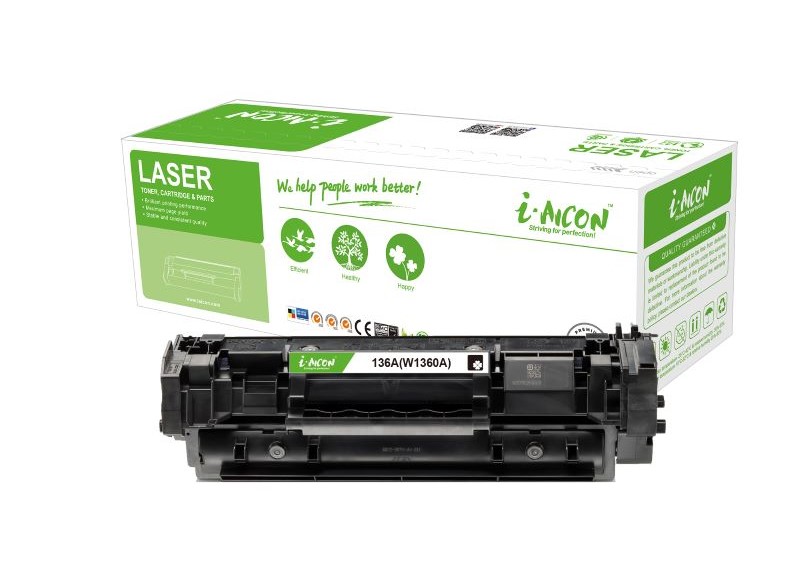
i.AICON Black Laser 136A (W1360a) Toner Cartridge